


Situation
A North American medical center faced significant challenges with an outdated appointment scheduling system that required in-person visits and manual queue management. This process was inefficient and created frustration among the 20,000 patients it served, hindering patient satisfaction and operational efficiency.
Task
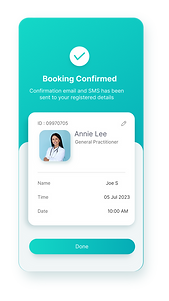
The medical center aimed to overhaul its existing system by introducing an online booking system that would be accessible, user-friendly, and efficient. The task was to design a system that not only simplified the appointment process but also catered to the diverse needs of the patient base, including features like language options, accessibility for the disabled, and secure payment methods.
Action
1. User Research and Prototyping:
Conducted focus groups and interviews to gather insights from patients and staff, leading to the development of user personas.
Designed and iterated on prototypes based on feedback, ensuring the interface was intuitive and met all user requirements.
2. System Design and Testing:
Integrated key features such as secure multi-factor authentication, doctor selection options, multilingual support, and accessibility features.
Engaged in continuous user testing to refine the system and ensure it performed well across all platforms and devices.
3. Implementation and Launch:
Implemented the system with robust backed support to handle secure data management and payment processing.
Provided comprehensive training for staff and informative materials for patients, ensuring smooth adoption of the new system.



Result
The new online booking system was successfully launched, leading to a significant reduction in administrative overhead and wait times at the center. Patient feedback was overwhelmingly positive, noting particularly the ease of use and the ability to choose and consistently visit the same doctor, which improved the continuity of care. The system effectively addressed the initial challenges, transforming the appointment scheduling process into a streamlined, patient-friendly experience.
Reflections
This project highlighted the importance of understanding user needs and incorporating continuous feedback into the design process, ultimately leading to a successful digital solution that improved both patient satisfaction and operational efficiency. The approach taken by the center serves as a model for similar healthcare facilities looking to enhance their service delivery through technology.


Usability Testing:
-
Conducted multiple rounds of usability testing with a diverse group of patients, including those with varying levels of technological proficiency and those with disabilities.
-
Evaluated the system's ease of use, navigation, and overall user satisfaction through direct observation and feedback forms.
-
Steps of Usability Testing:
-
Recruiting Participants:
-
Identified and recruited a diverse group of 50 patients, including those with varying levels of technological proficiency and those with disabilities.
-
Ensured recurring participation by engaging patients who regularly use the appointment system.
-
-
Surveys and Feedback:
-
Conducted pre-test surveys to understand users’ initial perceptions and expectations.
-
Collected detailed feedback after each testing session to gather insights on user experience and system performance.
-
-
Observation and Task Completion:
-
Observed participants as they completed key tasks such as booking an appointment, rescheduling, and making payments.
-
Recorded the time taken to complete each task and noted any difficulties encountered.
-
-
Success Metrics:
-
Measured task success rate, time taken to complete tasks, error rate, and user satisfaction.
-
Defined success metrics such as a task completion rate of 95%, an average task completion time of less than 2 minutes, and an error rate of less than 5%.
-
-
-
Results of Usability Testing:
-
Task Completion Rate: Achieved a 98% task completion rate, surpassing the target of 95%.
-
Task Completion Time: Average time to complete booking an appointment was 1.5 minutes, well within the 2-minute target.
-
Error Rate: Recorded an error rate of 2%, lower than the target of 5%.
-
User Satisfaction: 92% of participants reported high satisfaction with the system's ease of use and navigation.
-
Result:
The new online booking system was successfully launched, leading to a significant reduction in administrative overhead and wait times at the center. Patient feedback was overwhelmingly positive, noting particularly the ease of use and the ability to choose and consistently visit the same doctor, which improved the continuity of care. Usability testing confirmed high levels of user satisfaction, with 92% of participants finding the system easy to use and navigate. The system effectively addressed the initial challenges, transforming the appointment scheduling process into a streamlined, patient-friendly experience.
Reflections:
This project highlighted the importance of understanding user needs and incorporating continuous feedback into the design process, ultimately leading to a successful digital solution that improved both patient satisfaction and operational efficiency. The approach taken by the center serves as a model for similar healthcare facilities looking to enhance their service delivery through technology.
Future Improvements: (To further enhance the online booking system, the following improvements are recommended)
-
Personalized User Experience:
-
Implement AI-driven personalization to recommend doctors based on patient history and preferences.
-
Enable custom reminders and notifications based on user behaviour and appointment history.
-
-
Advanced Analytics:
-
Integrate advanced analytics to provide deeper insights into patient booking patterns and system performance.
-
Use data to continually optimize the user experience and identify areas for improvement.
-
-
Mobile App Enhancements:
-
Improve the mobile app interface to ensure consistency and usability across all devices.
-
Introduce features like in-app messaging for direct communication with healthcare providers.
-
-
Expanded Accessibility Features:
-
Enhance accessibility options, including voice commands and screen reader compatibility.
-
Provide additional language support to cater to a broader patient demographic.
-
-
Enhanced Security Measures:
-
Implement advanced security protocols to protect patient data and ensure compliance with healthcare regulations.
-
Regularly update and audit the system to address any potential security vulnerabilities.
-
-
Patient Engagement Tools:
-
Add features like health tracking, wellness tips, and patient education resources to increase engagement.
-
Enable virtual consultations and telemedicine options to provide more flexible healthcare access.
-
-
Feedback Loop Integration:
-
Continuously collect user feedback through surveys and in-app prompts to inform future updates.
-
Create a dedicated feedback portal where patients can easily share their experiences and suggestions.
-